
Experience the most advanced locum tenens technology with MyWeatherby
Access more locums jobs, with an easier way to find the right one for you.
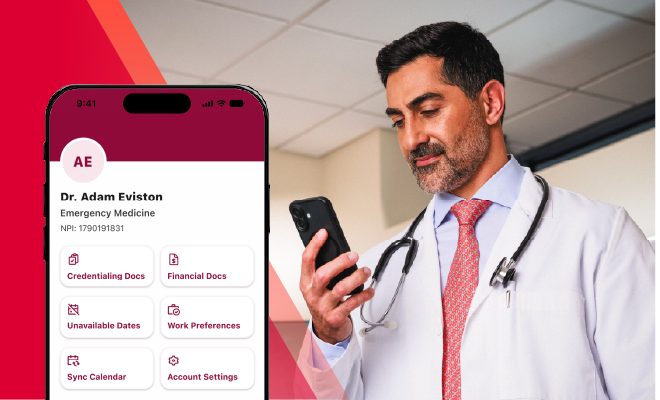
What you get from MyWeatherby

Find work that fits
It’s easy to set preferences by specialty, location, setting, schedule, and more, so the app presents opportunities that fit your life.

Get to work faster
Experience less back-and-forth, fewer delays, and a simpler way to keep the process moving.

Own your schedule
Take control by adding availability, blocking time off, and building assignments around your life.

Get paid with less hassle
Submit your time and reimbursements directly from the app and get your well-deserved payday right on time.
What providers are saying about MyWeatherby
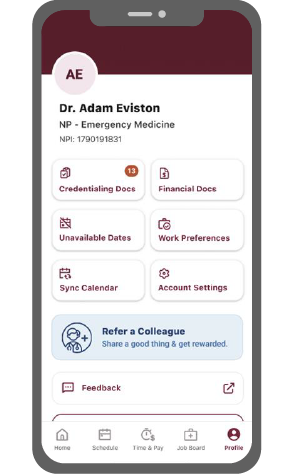
Get the MyWeatherby provider app on your phone
Job matching, credentialing, scheduling, and pay have never been easier to manage. Keep them all right at your fingertips.


FAQ
MyWeatherby is your locum tenens career command center, built to go wherever your assignments take you, on any device. Whether you’re at your desk, between patients, or checking details on the move, MyWeatherby gives you real-time access to the things that matter most: your schedule, your pay, your travel details, your jobs, and your Weatherby team.
Getting started only takes a few minutes. Create your account at my.weatherbyhealthcare.com or ask your recruiter to walk you through it. Once your account is set up, download the app so you have MyWeatherby ready whenever and wherever you need it.
• Create your account: my.weatherbyhealthcare.com
• Download on iOS: App Store
• Download on Android: Google Play
Think of MyWeatherby as one connected experience, available in two convenient ways. Almost everything works on both, so use whichever device is easiest for you in the moment, whether that's your laptop or phone. The one exception is that the MyWeatherby website is where you’ll complete your application. You only need to do this once, and it stays on file for up to two years. Once it’s complete, you’re ready to pursue any job you want.
Aside from completing your application, which must be done in the portal, you can access all of the same features through the MyWeatherby mobile app and portal:
• Search new locum tenens jobs and notify your recruiter with one click
• View confirmed, active, and completed assignment details
• Upload and manage credentialing documents in a secure, cloud-based hub
• Track your time and access your pay history
• Access flight, hotel, and rental car itineraries with real-time updates
• Sync your work and personal calendars
• Set your unavailability and work preferences
• Connect with your full Weatherby support team
• Get reminders and alerts so you never miss a beat
You can now set your availability and work preferences directly in MyWeatherby—down to specific days—on the website or in the app. When you update your schedule, your recruiter is notified automatically and can focus on finding jobs that fit your life.
When you find a job you’re interested in on the website or app, simply hit the Send Interest button. Your recruiter gets notified right away, along with any questions or notes you want to include.
Your privacy is always our priority. MyWeatherby follows industry best practices for data security, so your personal and professional information stays protected wherever you access it.
We’re constantly releasing exciting updates. When you log in, you’ll be notified about anything new. We take provider feedback seriously and keep improving based on what empowers your career.
Your recruiter is your first call, as they can quickly fix most issues and ensure your information is accurate. You can also use the Site Feedback link in the portal to flag anything you run into.
MyWeatherby is designed to work in all modern browsers. For the best experience, use the latest version of Chrome, Firefox, or Microsoft Edge.
Have an idea for a new feature?
Your feedback is always valued and helps guide our next innovations. Reach out to your recruiter or use the Site Feedback link in the portal to share any ideas.